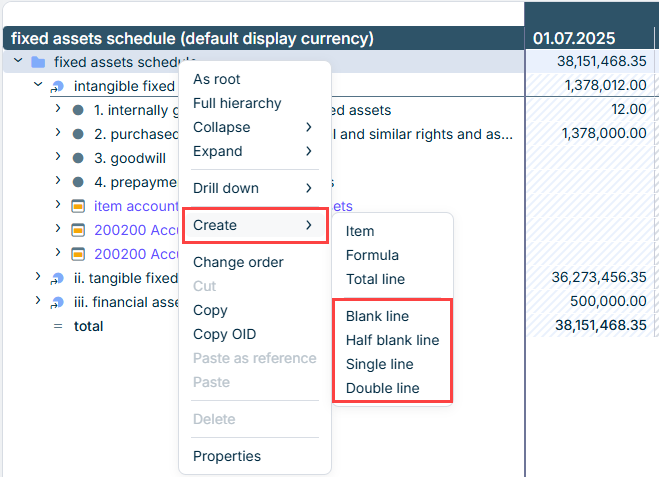
In Consolidation & Financial Planning (CFP), separators are empty lines that structure ledgers and schedules visually. Separators have no name and no values.
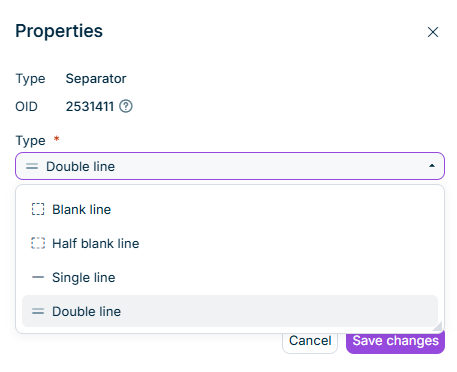
The following line types are available for separators:
Line type
Description
Blank line
Displays an empty row
Half blank line
Displays an empty row with half the row height
Single line
Displays a single horizontal line
Double line
Displays a double horizontal line
Separators can be created in a ledger or schedule if Separator is listed on the Elements tab of the ledger or schedule in the Workspace configuration.
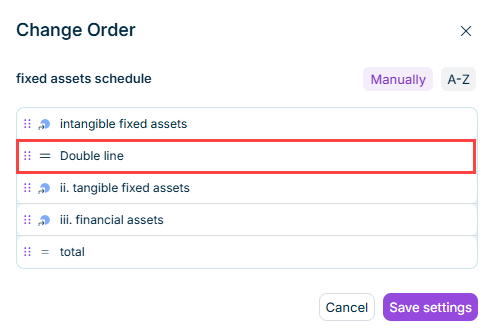
Separators are sorted in the Change Order dialog of the item, folder, or root folder that contains them. Because separators have no name, the dialog displays their line type, for example Double line. Separators are sorted together with the other elements, such as items. Accounts are sorted separately.
To change the order of separators:
1
Right-click the item, folder, or root folder that contains the separators and choose Change order from the context menu. The Change Order dialog is displayed:
Changing the order
2
Click Manually, drag the separators to the desired position, and click Save settings.
The context menu of a separator itself does not contain the Change order menu command, because separators have no subordinate elements.