In Consolidation & Financial Planning (CFP), exchange rates for exchange rate tables can either be queried from the European Central Bank or imported from MS Excel.

In CFP, exchange rates can be queried online from the ECB and imported at the same time into one or more exchange rate tables. All the EURO exchange rates of these currencies, as well as all the exchange rates between these currencies, can be queried.

To call up the exchange rates from the ECB in CFP:

1

Right-click the root folder Exchange rate tables or an individual exchange rate table.

2

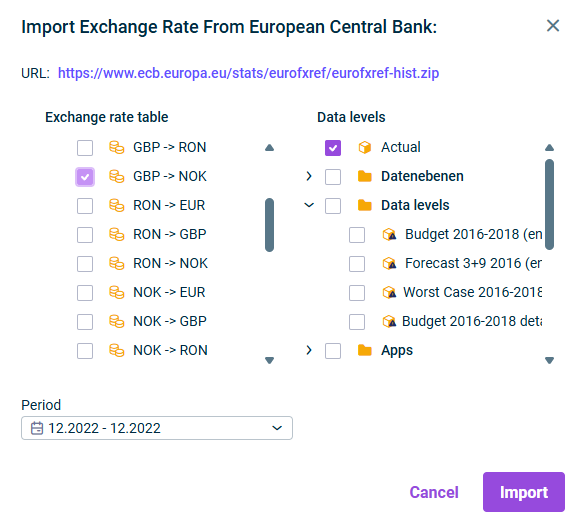
Choose Import | Import exchange rates from European Central Bank from the context menu. The Import Exchange Rate From European Central Bank dialog is displayed:

Shows the 'Import Exchange Rate From European Central Bank:' dialog in CFP with the URL 'https://www.ecb.europa.eu/stats/eurofxref/eurofxref-hist.zip', the 'Exchange rate table' list, in which 'GBP -> NOK' is selected, the 'Data levels' list, in which 'Actual' is selected, the 'Period' field set to '12.2022 - 12.2022', and the 'Cancel' and 'Import' buttons.
‘Import Exchange Rate From European Central Bank’ dialog
3

Specify the exchange rate table, data level, and period.

4

Click Import.

  • All of the exchange rates in the selected data levels and in the selected time period defined in CFP are updated on the basis of the exchange rates from the ECB.
  • The most recently available exchange rate of the respective month is used as the closing exchange rate.
  • The average exchange rate is determined in CFP by calculating the average using the daily closing exchange rates of the month. This means that the ECB calculation method is used.

To import exchange rates from MS Excel in CFP:

1

Right-click the Exchange rate tables root folder.

2

Choose Import | Import exchange rates from MS Excel from the context menu.

3

Navigate to the desired file and click its name.

4

Click Import or press Enter to start the import.

In CFP, the import can be carried out successfully only if the structure of the MS Excel file matches the structure of an exchange rate file export file (see Exporting Exchange Rates in CFP).

This content was generated using AI and reviewed by Lucanet subject matter experts before publication.