



orMonth, quarter, trimester, semester, year orCalendar fiscal year – when selected, the system automatically adds columns for all previous years with actual data for the respective reporting entity and displays the actual amounts.Total period view
The column linked to the actual data level is cleared (if previously populated) and locked for editing.actual period The columns linked to the selected planning data level are cleared and the fields can be edited (numbers and basic mathematical operations are allowed). If a formula has been applied that generates results in the planning period column, the corresponding fields are not editable.planning period The ,Cost center andPartner columns are locked for editing.Transaction Type
When is selected, entering values at the monthly level and changing the view to quarter, trimester, semester, or year will automatically display the sum of the corresponding months in the period columns. If values are entered on a yearly level, the values are split evenly across all months.Sum When is selected, enter values only at the monthly level. If you switch to a higher time period view, the period columns will show '...' and a tooltip indicating that values are displayed only on the monthly level because no aggregation is selected.No aggregation
The columns , andCost center/Partner/Transaction Type name are enabled and can be edited.Variable The andactual columns are automatically filled with values from the database by the system. Fields are locked for editing.planning period The field is locked for editing.Formula
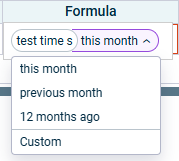
It is only possible to enter fixed values with up to two decimals. Formulas can be added to planning and independent variable rows, but to querying rows.not When a variable is added, a time offset is automatically displayed, withTime offset: as the default value. Time offset defines the period from which values are retrieved and used in the calculations of the amount shown in the time period column.this month

When using formulas, changes in one calculation can affect other dependent business transactions. The system can recalculate these dependencies automatically or on demand (see ).Dependent Business Transactions Formulas that create dependencies between transactions may lead to circular references. The system detects and manages these cases (see ).Dependent Business Transactions
Last updated on Aug 16, 2023