Directory structures are workspaces that are used for creating and editing elements such as apps, scripts, or Lucanet.Excel-Reporting files.

In the Workspace configuration, you can create any directory structures and individually configure which elements can be created within a directory structure.

In the Overview, each directory structure is displayed in the folder as a workspace in which it was created.

Customers who have already used directory structures in Lucanet.Financial Client, can view and edit all directory structures created there in the CFO Solution Platform.

1

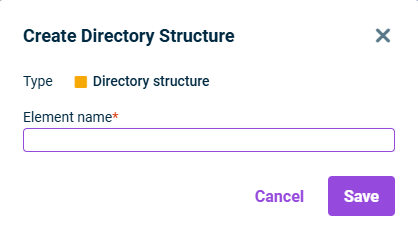
Right-click the root folder or a folder in the Workspace configuration and select Create | Directory structure from the context menu. The Create Directory Structure dialog is displayed:

Displays the 'Create Directory Structure' dialog.
Creating a directory structure
2

Enter the name of the directory structure.

3

Click Save.

Directory structures can only be created below the root folder or a folder. Creating directory structures below other element types is not possible.

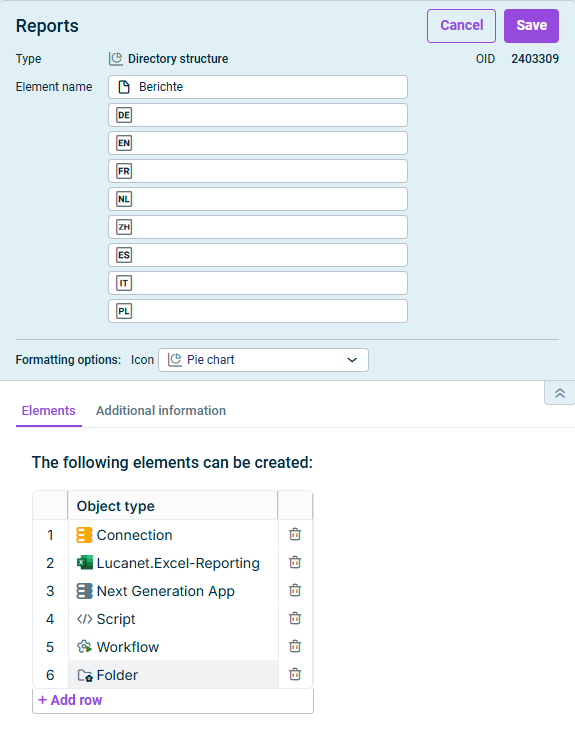
To configure a directory structure, click the name of the directory structure in the tree view and then at the top right click Edit to open the editing mode:

Displays the detail view of a directory structure in the edit mode.
Editing a directory structure

If necessary, use the Elements tab to define which elements can be created in the directory structure. The available object types are described in the following section.

The following object types can be enabled in a directory structure.

Used to create an app as a functional extension of the Lucanet software.

Used to create connections that contain connection information for SQL databases

Used to create scripts (see Creating and Executing Scripts)

Used to create Excel reports within Lucanet.Excel-Reporting

Used to create folders

Used to create workflows to automatically execute executable elements such as scripts, or data imports into Lucanet.Financial OLAP Server in a fixed sequence.

(Currently, this object type can only be created but cannot yet be used.) The use of a workflow will only be available with a later version of the CFO Solution Platform.