Encryption methods encrypt and decrypt data that is exchanged via channels: Lucanet Banking & Cash Management (BCM) encrypts the data before sending and decrypts it after receiving. This way, sensitive information is protected during transmission.

Encryption methods work in both directions:

  • Sending: BCM automatically encrypts outgoing files before it sends them via communication channels, for example, SFTP or e-mail.

  • Receiving: BCM automatically decrypts encrypted files from external systems, for example, ERP systems, before it processes them further.

You link an encryption method directly to a channel via the Encryption method field. The same method then handles the encryption of outgoing and the decryption of incoming data of this channel.

Which encryption method you select depends on your requirements and on the compatibility with your external partners. You configure an encryption method once; BCM then automatically applies it to all data transmissions of the linked channels.

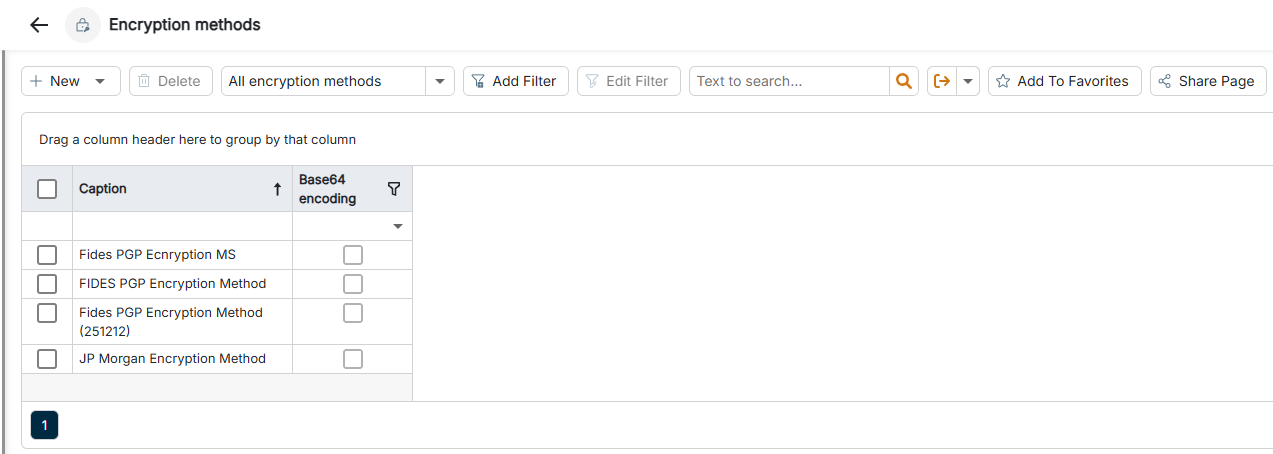
The Encryption methods workspace can be found under Banking & Cash Management | Channels | Encryption methods and is displayed as follows, for example:

The Encryption methods workspace is highlighted in the menu navigation.
'Encryption methods' workspace in the menu navigation

To create an encryption method:

1

Navigate to Channels | Encryption methods.

2

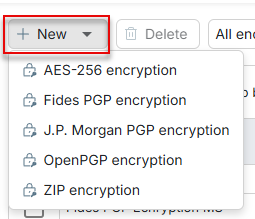
Click the Plus icon in the upper left corner and select the required encryption method in the drop-down list.

The available encryption methods are displayed.
Creating an encryption method
3

Configure the method according to your requirements (see Available Encryption Methods).

4

Click Save. With Save and Close, you save the method and return to the list.

The following table provides an overview of the available encryption methods:

Encryption methodDescription
AES-256 encryptionSymmetric encryption with the AES-256 algorithm — suitable for the fast encryption and decryption of large amounts of data.
Fides PGP encryptionSpecial PGP implementation for the communication with the Fides system, which provides the SWIFT connection. Uses a Public key of Fides and optionally a Private key with the associated Password.
J.P. Morgan PGP encryptionSpecial PGP implementation tailored to the requirements and key formats of J.P. Morgan. Uses a Public key from J.P. Morgan and optionally a Private key with the associated Password.
OpenPGP encryptionStandard PGP encryption (Pretty Good Privacy) with public and private keys — asymmetric encryption, widely used in e-mail and data exchange. At least one of the keys Public key or Private key is mandatory. If you store a Private key, the associated Password that decrypts the key is required.
ZIP encryptionSimple password-based encryption of ZIP archives — for compressing and simultaneously encrypting several files.