In Consolidation & Financial Planning (CFP), transaction types provide information on the reason for changes to an account. As a result, transaction types allow for seamless integration of schedules and cash flow statements in CFP on the level of the individual and consolidated financial statements, e.g. simultaneously in accordance with HGB, IFRS and US GAAP.
The following table describes the default transaction type in CFP:
Name
Uses
000
During data imports or for manual postings without transaction type assignment, this transaction type accumulates all values that must be subsequently transferred, either manually or using suitable interfaces, to the financial accounting source system for maintenance of schedules.
The following table describes the transaction type for the currency translation of balance accounts in CFP:
Name
Uses
Currency difference
CFP posts adjustments to the closing exchange rate to this transaction type for all balance accounts of the chosen transaction type category. It is also possible to post transaction types of type currency difference. They can be the target of a data import, for example, and can be chosen from the assignment table.
The following table describes the transaction types for value queries in CFP:
Name
Uses
Default
This transaction type is used for querying values.
Start
This transaction type is used for querying the balances of the previous period. When viewing schedules, this transaction type is queried, for example, to display the balance of a balance account at the beginning of the period.
TF
This transaction type is used for querying values. When viewing the transaction balance sheet, this transaction type is queried, for example to display the transaction figure on a balance account.
Balance
This transaction type is used for querying values. When the balance sheet is viewed, this transaction type is queried, for example, to display the balance on a balance account at the end of the period.
The following table describes the user-defined transaction types in CFP:
Name
Uses
User-defined
In order to recreate customer-specific requirements for each schedule, you can create any number of individual, user-defined transaction types in each transaction type category.
Right-click the transaction type category under which the transaction type is to be created.
2
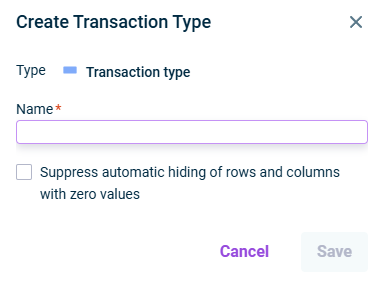
Select Create | Transaction type from the context menu. The Create Transaction Type dialog is displayed:
Creating a transaction type
3
Specify the name of the element.
4
Activate the check box Suppress automatic hiding of rows and columns with zero values if lines and columns with zero values are also to be displayed.
5
Click Save.
After creating a transaction type, you can configure this transaction type and subsequently enable or disable the option Suppress automatic hiding of rows and columns with zero values as well as change the name of the transaction type.
This content was generated using AI and reviewed by Lucanet subject matter experts before publication.