In Consolidation & Financial Planning (CFP), a distinction is made between transaction currencies and display currencies. Transaction currencies are the currencies in which postings are made. Display currencies are the currencies in which amounts are displayed. To display values, postings in transaction currency are translated into the display currency using exchange rate tables.

To create a currency in CFP:

1

Right-click one of the two root folders transaction currency or display currency.

2

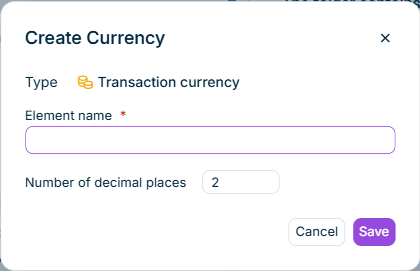
Choose Create | Transaction currency or Display currency from the context menu. The Create Currency dialog is displayed:

Shows the 'Create Currency' dialog in CFP with the type 'Transaction currency', the empty mandatory 'Element name' field, the 'Number of decimal places' field set to '2', and the 'Cancel' and 'Save' buttons.
Creating a currency
3

Specify the name of the element.

4

If needed, change the Number of decimal places.

5

Click Save.

Notes on the number of decimal places:

  • The number of decimal places cannot be changed subsequently.
  • The specified number refers to the rounded display of values in ledgers and schedules and not to the number of decimal places for the input of exchange rates that are applied for the currency translation.
  • The number of decimal places is limited to ten.

Note on currency configuration:

After creating a currency, you can configure it and change its name.

This content was generated using AI and reviewed by Lucanet subject matter experts before publication.

Page IDKB8063388

Last updated on Nov 18, 2026