In Consolidation & Financial Planning (CFP), the Lucanet dimensions can be administrated and modified in accordance with the specific user in the Dimensions workspace.

The following pages describe the dimensions available in CFP:

  • Reporting entities: In CFP, you can create all elements to which postings can be made in the Reporting entities workspace.
  • Organization elements: In CFP, the structure of your enterprise is recreated in the Organization elements workspace.
  • Currency translation: In CFP, the Currency translation workspace is used to create, edit and delete transaction currencies, display currencies, and exchange rate tables.
  • Partners: In CFP, partners can be created, managed, and deleted in the dimension of the same name.
  • Data levels: In CFP, the Data levels workspace is used to create, manage, and delete data levels.
  • Adjustment levels: In CFP, the Adjustment levels workspace is used to create, administrate, and delete adjustment levels, adjustment levels for consolidation postings, and adjustment level groups.
  • Transaction types: In CFP, the Transaction types workspace is used to create, manage, and delete transaction type categories and transaction types.
  • Fiscal years: In CFP, the Fiscal years workspace is used to create, administrate, and delete fiscal years in the Lucanet database.

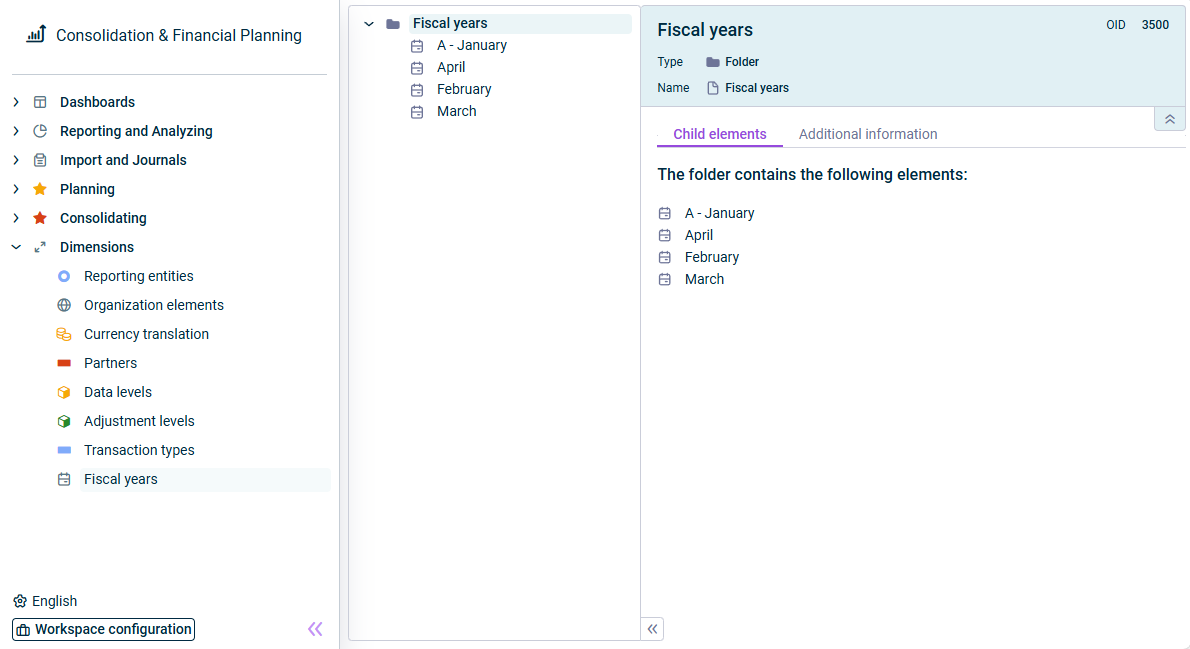
The Dimensions workspace in CFP is displayed as follows, for example:

Shows the 'Dimensions' workspace in CFP. The overview lists the dimensions 'Reporting entities', 'Organization elements', 'Currency translation', 'Partners', 'Data levels', 'Adjustment levels', 'Transaction types' and 'Fiscal years' under 'Dimensions'. 'Fiscal years' is selected, and the detail view displays the 'Fiscal years' folder with the 'Child elements' tab listing 'A - January', 'April', 'February' and 'March'.
'Dimensions' workspace

This content was generated using AI and reviewed by Lucanet subject matter experts before publication.

Page IDKB3309112

Last updated on Nov 18, 2026

Table of Contents
Overview